How to Use Hermes Agent with OpenRouter: Setup, Models & Routing
OpenRouter · · Updated
Hermes Agent is OpenRouter’s most-used application by token volume, having processed more than 17 trillion tokens so far. OpenRouter is one of the primary ways people run Hermes Agent, so the setup is mature, widely used, and fully supported.
Hermes Agent is an open-source autonomous agent from Nous Research that runs directly in the terminal, and it can work with any model you choose. When you connect it to OpenRouter, you get access to more than 400 models from over 70 providers, along with automatic failover and a single bill, all through one API key.
One thing to clear up before anything else: Hermes Agent and the Hermes model family (Hermes 3 and Hermes 4) are different parts of the same ecosystem from Nous Research. Hermes Agent is the application, while Hermes 3 and Hermes 4 are language models it can run on. This guide explains the distinction and then walks through the complete setup and routing configuration.
Tl;dr
- Hermes Agent is Nous Research’s open-source autonomous CLI agent. The Hermes 3 and Hermes 4 models are separate; the agent can run on either, or on any model via a gateway.
- The default model for basic setup is
~anthropic/claude-sonnet-latest.openrouter/autoandopenrouter/pareto-codeare optional routing modes for specific use cases. - Most configurations require a model with at least 64K context tokens. Smaller windows may be rejected because the system prompt plus tool schemas fill them. Check context length at openrouter.ai/models before choosing.
- One OpenRouter key gives the agent access to 400+ models from 70+ providers with automatic failover for supported models, so a single provider outage doesn’t stop a session. The same key works in any coding agent or AI tool.
- Routing config, fallback chains, and auxiliary-model offloading live in
~/.hermes/config.yaml. Side tasks like titling and vision can run on cheaper models than the main loop. - Running the agent is free (it’s MIT-licensed); you pay only for the model tokens it spends. See openrouter.ai/pricing for current billing details.
What Is Hermes Agent? (And What It Isn’t)
Much of the confusion around Hermes stems from the fact that Nous Research created both an agent and a family of language models that share the same name. Hermes Agent is a command-line application, while Hermes 3 and Hermes 4 are language models that can serve as the agent’s backend.
When people search for “Hermes 3”, “Hermes 4”, or “Hermes 4 405B”, they’re usually looking for the language models. Hermes Agent is the application, and Hermes 3 and Hermes 4 are models that can be used as backends for it.
Agent vs model: the disambiguation
| Hermes Agent | Hermes 3 / Hermes 4 | |
|---|---|---|
| What it is | Autonomous CLI agent (an application) | Language models (the brains) |
| Maker | Nous Research | Nous Research |
| You run it by | Installing the CLI, pointing it at a model | Calling it as a model ID through a provider |
| License | Open-source (MIT) | Nous Research model weights under their own terms |
| Relationship | Needs a model to think | Can be a model backend that Hermes Agent runs on |
What Hermes Agent actually does
Hermes Agent comes with more than 40 built-in tools for tasks like web search, browser automation, and image understanding. It also includes a messaging gateway that connects to over 20 platforms, including Telegram, Discord, Slack, WhatsApp, Signal, and Matrix.
What sets it apart from a typical chat interface is its persistent memory system. It can remember information across sessions, so you don’t have to keep repeating project details or context every time you start a new conversation.
The agent is also flexible about where it runs. You can deploy it locally on your machine or use environments such as Docker, SSH, Daytona, Modal, and Singularity.
Why run Hermes Agent with OpenRouter?
If you’ve ever worked with multiple AI providers, you know how quickly things get messy. Every provider has its own account, API key, billing setup, and model catalog. OpenRouter gives you access to more than 400 models from over 70 providers through a single API key and billing account.
OpenRouter is already the most popular backend for Hermes Agent. As of June 2026, Hermes Agent ranks first on OpenRouter’s app rankings by total token usage, with more than 17 trillion tokens processed. The integration is widely used, well-tested, and proven at scale.
| Without a gateway | With OpenRouter |
|---|---|
| One account, key, and bill per provider | One key for 400+ models across 70+ providers |
| Manual retry when a provider 5xxs or rate-limits | Automatic failover, mid-session, no ops work |
| Pay for failed calls on some providers | Failed requests aren’t billed |
| Separate usage view per provider dashboard | One activity dashboard across every model |
| Provider list price plus your own markup math | No markup; catalog price plus a platform fee |
You can switch between models by changing a single string. Everything the agent does is tracked in one place through your usage view at openrouter.ai/activity.
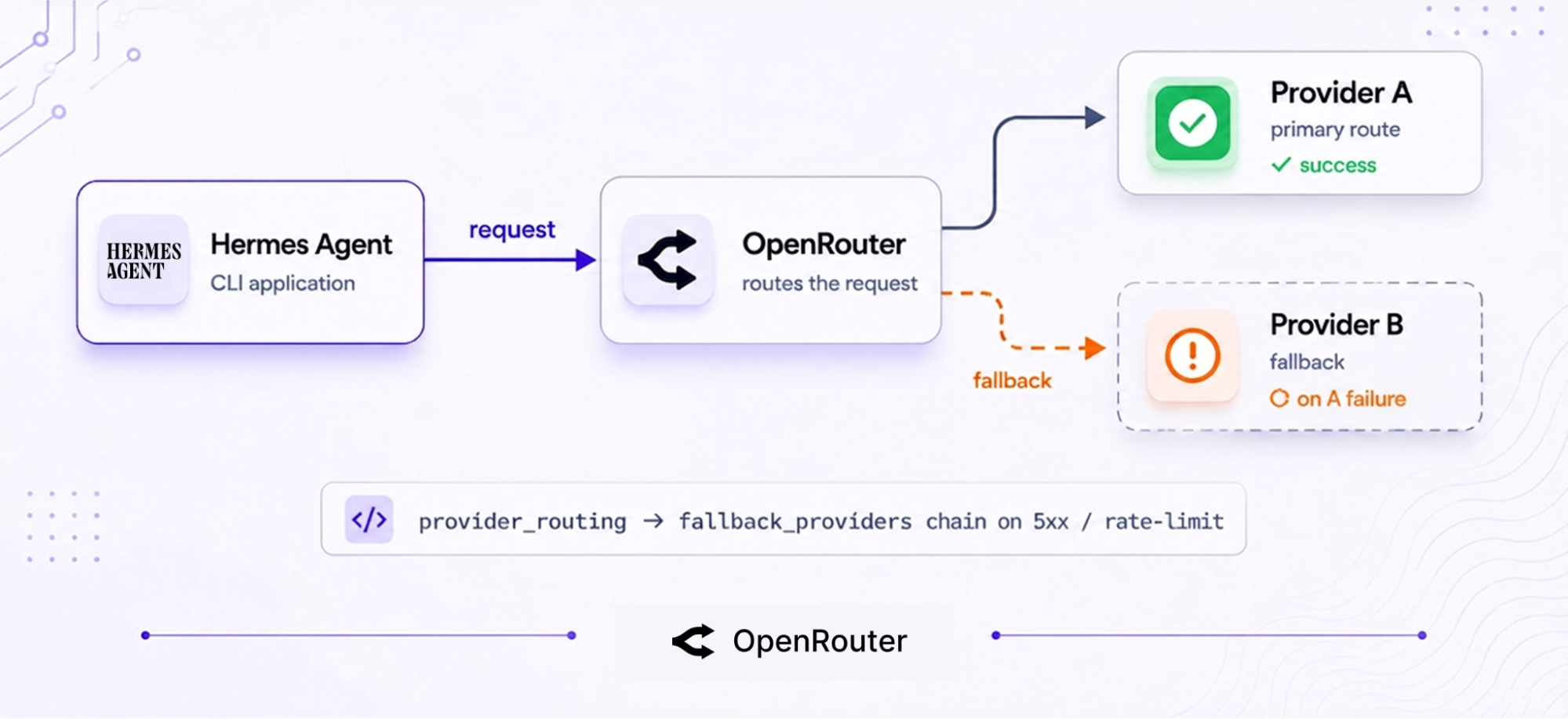
OpenRouter automatically load balances across providers and switches over if a provider returns 5xx errors or hits rate limits, so long-running agent tasks aren’t interrupted when a provider goes down. Billing behavior for failed requests is covered by zero-completion insurance.
Setup: Connect Hermes Agent to OpenRouter
If you haven’t installed Hermes yet, start with:
curl -fsSL https://raw.githubusercontent.com/NousResearch/hermes-agent/main/scripts/install.sh | bashIt works on Linux, macOS, WSL2, and Termux. Windows support through native PowerShell is still in early beta.
Once installed, connecting Hermes Agent to OpenRouter takes 2 steps: create an API key, then configure Hermes to use it. Once configured, Hermes Agent authenticates with OpenRouter and uses the model slug you specify in your config for all tasks.
Context length is a hard constraint. Most setups require at least 64K tokens of context, and the agent may refuse to start with smaller windows.
The system prompt and tool schemas already consume a significant portion of the context window before any conversation begins. You can check supported context sizes for any model at openrouter.ai/models.
Recommended: interactive setup
The OpenRouter cookbook recommends starting with the interactive model picker:
hermes modelThis walks you through selecting a provider and configuring your model. The Hermes CLI is still actively evolving, so refer to the latest integration cookbook for the exact flow; the interactive steps can change between versions.
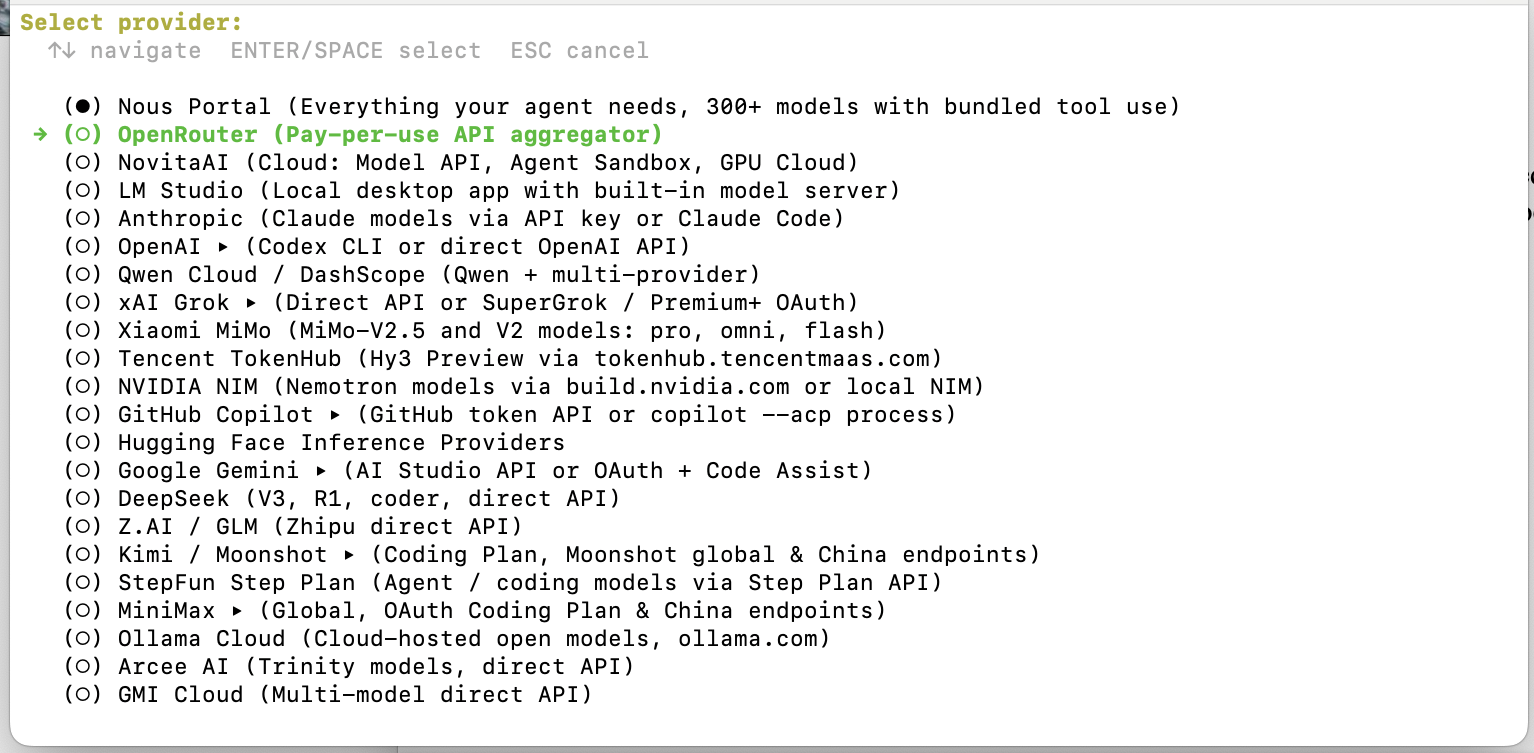
When choosing a model, make sure it has at least 64K context. The recommended starting option is typically ~anthropic/claude-sonnet-latest. You can filter models by context length at openrouter.ai/models to confirm before you proceed.
A successful setup is easy to recognize. After running hermes chat, you should see the Hermes Agent prompt showing your connected provider and selected model.
If you get a 401 error or a “provider not found” message, it usually means the API key wasn’t saved correctly, or there’s a typo in the provider name. Rerunning the setup command normally fixes it.
Quick: the direct config path
If you prefer to skip the interactive setup, save your API key and start a chat immediately:
hermes config set OPENROUTER_API_KEY sk-or-...
hermes chat --provider openrouter --model '~anthropic/claude-sonnet-latest'
Replace sk-or-... with your actual OpenRouter API key. This saves the key and starts a chat using the ~anthropic/claude-sonnet-latest alias. The ~ prefix tells OpenRouter to resolve to the latest model in that family.
This approach is useful when provisioning agents programmatically and you want to avoid an interactive setup flow.
Manual config (advanced)
Secrets are stored in ~/.hermes/.env, while model and provider settings live in ~/.hermes/config.yaml. Features such as compression, auxiliary models, and other advanced options are configured directly in config.yaml.
Add your API key to ~/.hermes/.env and load it from your environment or a secrets manager. Don’t commit it to version control:
OPENROUTER_API_KEY=<your-api-key>Put the model and provider in ~/.hermes/config.yaml:
model:
  provider: openrouter
  default: ~anthropic/claude-sonnet-latest
This approach is handy when you’re version-controlling a setup or spinning up agents programmatically.
Choosing a Model
The most important requirement when choosing a model for Hermes Agent is context length. Most configurations need at least 64K tokens to run properly.
Models with smaller context windows often fail to start, so before selecting a model, go to openrouter.ai/models, filter by context length, and make sure your choice supports at least 64K tokens.
How model IDs work
OpenRouter model IDs use a provider/model-name format. The ~ prefix is a routing shortcut: it tells OpenRouter to automatically resolve to the latest available version of a model family, rather than lock you to a specific release.
| Model ID | What it resolves to |
|---|---|
~anthropic/claude-sonnet-latest | Latest Claude Sonnet alias (the default for basic setup) |
~google/gemini-flash-latest | Latest Gemini Flash alias (cheap, fast, good for side tasks) |
deepseek/deepseek-v4-flash | DeepSeek’s fast chat model (strong value) |
openrouter/auto | Auto-routing across the catalog, driven by the market’s spend share for each task type |
You can browse the full catalog on the models page and filter by context length, price, and capabilities. For the workflows in this guide, anything under 64K is unlikely to run.
Auto-routing when you don’t want to choose
openrouter/auto is an optional routing mode. It automatically picks a strong model for each request based on the aggregate spend of the OpenRouter community over a trailing 7-day window for that kind of task. It’s a good starting point if you don’t have a preferred model and just want reliable results without doing any benchmarking.
When you need more control, the routing section below offers finer-grained options.
Provider Routing, Fallbacks & Auxiliary Models
Once Hermes Agent is connected, routing in ~/.hermes/config.yaml determines cost, reliability, and how failures are handled.
The 3 main controls in this file (provider routing, fallback chains, and auxiliary model offloading) are independent, so you can mix and match them.
At a high level: model selection decides which task is sent to which model; provider_routing decides which provider actually executes the request; and if that provider fails, fallback_providers take over and reroute the request without breaking the session or losing context.
Provider routing controls
The provider_routing section controls which provider handles each request:
| Field | What it controls | Example value |
|---|---|---|
sort | Optimization axis | throughput, price, latency |
only | Allowlist of providers | [anthropic] |
ignore | Blocklist of providers | [novita] |
order | Explicit provider priority | [anthropic, google] |
data_collection | Whether prompts can be logged by providers | deny |
Set data_collection: deny to prevent your prompts from being logged by providers. The provider routing documentation covers the other allowed values.
The :nitro and :floor suffixes are request-level shortcuts for the sort setting. :nitro maps to sort: throughput, prioritizing speed for that specific request, while :floor maps to sort: price, choosing the cheapest available provider. These override provider_routing for that single call only, which is useful when you want temporary behavior changes without editing your config file.
Fallback chains
The fallback_providers setting kicks in when the primary model fails. Each entry is a provider-and-model pair; when one fires, Hermes swaps to it mid-session without losing your conversation.
fallback_providers:
  - provider: openrouter
    model: ~anthropic/claude-sonnet-latest
  - provider: openrouter
    model: ~google/gemini-flash-latest
If the primary errors out, the request routes to the next entry and Hermes Agent keeps its memory and context intact. For an agent that runs for hours, this is the difference between a transient provider blip and a dead session.
Auxiliary models
Auxiliary models handle side tasks such as generating titles, handling vision requests, and performing compression. This keeps your main model focused on the actual reasoning and coding tasks.
auxiliary:
  title:
    provider: openrouter
    model: ~google/gemini-flash-latest
  vision:
    provider: openrouter
    model: ~google/gemini-flash-latest
  compression:
    provider: openrouter
    model: ~google/gemini-flash-latest
There’s no reason to use a high-cost model like Claude Sonnet for simple tasks such as generating a conversation title. Offloading these to a cheaper model, such as Gemini Flash, cuts costs while keeping the main workflow unchanged.
A good rule of thumb: point the auxiliary tasks at the cheapest model you trust for each job.
Cutting costs with the Pareto Code router
If you want cost control without manually testing and comparing models, openrouter/pareto-code lets OpenRouter automatically choose the cheapest model that still meets a minimum quality bar:
model:
  provider: openrouter
  model: openrouter/pareto-code

openrouter:
  min_coding_score: 0.65
With this enabled, OpenRouter selects the lowest-cost model that meets your chosen threshold for each coding task. The integration handles the request formatting automatically, so you don’t need to manage routing logic yourself.
The coding score ranges from 0.0 to 1.0, where higher values mean stronger but more expensive models. A good starting point is 0.65:
- Lower it for routine edits where speed and cost matter more than precision
- Raise it for complex refactors where correctness is more important than saving tokens
Stacking the cheap options
openrouter/pareto-code controls the main coding loop, while auxiliary handles side tasks like titles, vision, and compression. These work together, and you can also combine them with :floor routing for additional cost savings.
OpenRouter also provides more than 25 free models across several providers. If you pick a free model with 64K+ context, you can run a low-cost or even zero-cost setup for hobby use, while reserving Pareto routing for tasks that actually need higher-quality models. Check current pricing and free-tier availability at openrouter.ai/pricing.
Monitoring Usage & Troubleshooting
Everything the agent uses goes through a single API key, which means all activity is visible in one place. You can track requests, costs, and token usage across all Hermes Agent sessions at openrouter.ai/activity, with filters for model and time range.
Common errors and fixes
Most setup issues fall into 2 categories:
- If Hermes can’t find your API key at all, the problem is local. This usually means the key was never saved to
~/.hermes/.env. - If the key exists but authentication still fails, the issue is on the account side. The key may be invalid, expired, or your OpenRouter account may have no remaining credits.
| Problem | Fix |
|---|---|
| ”No API key” / provider not found | Verify ~/.hermes/.env has the key, or rerun the setup command |
| 401 / 403 errors | Check key validity at openrouter.ai/keys and confirm your credit balance |
| Model not responding | Verify the model ID in ~/.hermes/config.yaml matches a valid provider/model-name at openrouter.ai/models |
| Context errors at startup | Switch to an OpenRouter model with at least 64K context |
If a model works in other setups but refuses to start in Hermes Agent, it’s usually the 64K context requirement, rather than a misconfiguration. Switch to a different model instead of debugging the YAML.
If you’re exploring other terminal-native agents, OpenRouter also provides a cookbook integration for OpenClaw, a multi-platform chat agent that uses the same backend.
Frequently Asked Questions
Is Hermes Agent the same as the Hermes 3 / Hermes 4 model?
No. Hermes Agent is the open-source autonomous CLI application by Nous Research; Hermes 3 and Hermes 4 are separate model families by the same team. You can run Hermes Agent using a Hermes model as its backend, or any model, through OpenRouter.
Is Hermes Agent free?
The agent is open-source (MIT) and free to run. You pay only for the model tokens it uses through your provider. See openrouter.ai/pricing for current rates, including free-tier models.
What model should I use with Hermes Agent on OpenRouter?
Start with ~anthropic/claude-sonnet-latest: it’s the documented default for basic setup and clears the 64K context requirement. Once you’re running, openrouter/auto auto-routes to a strong model without you having to choose, and openrouter/pareto-code optimizes cost specifically for coding tasks.
Do I need separate provider accounts?
For most supported models, no. One OpenRouter key grants Hermes Agent access to 400+ models from 70+ providers, with automatic failover.
If you hit an access error on a specific model, check that model’s page at openrouter.ai/models; some models require provider-specific eligibility. In most cases, switching to a different model resolves the issue.
Why does Hermes Agent reject my model at startup?
Most configurations require at least 64K context tokens; smaller windows may not hold the system prompt plus tool schemas. Switch to a larger-context model. Filter by context length at openrouter.ai/models to find candidates.
Does OpenRouter charge extra to run Hermes Agent?
There’s no markup on provider pricing. See openrouter.ai/pricing for current platform fees and billing details, including how failed requests are handled.